
Create Example Notebooks
Example notebooks (pre-packaged code) help users understand how to work with your dataset. You can create them either in Notebook Lab or in your local development environment.
Option A: Create Notebooks Locally
If you prefer to build notebooks in your own environment, you can use your normal Git workflow:
- Clone your linked GitHub notebook repository
- Create or edit notebooks in your preferred local editor or IDE
- Test notebooks with your dataset
- Commit and push your changes to GitHub
Once merged, the notebooks are available to users via Explore the Data.
Option B: Create Notebooks in Notebook Lab (Recommended)
Use Notebook Lab to create and test notebooks directly with your mounted data.
Automatic Repository Setup
- The first time Notebook Lab launches for a dataset, MSD-LIVE automatically clones the GitHub repository you configured in Set Up a Notebook Repository
- The repository is cloned into your home directory under the
notebooks/folder - Files in this environment persist across Notebook Lab sessions for the same dataset
Create and Edit Notebooks
- Launch Notebook Lab from your dataset landing page
- Open the
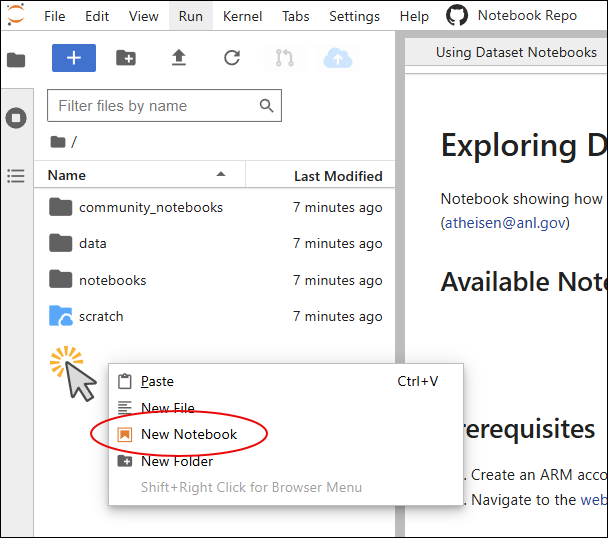
notebooks/folder in the file explorer - Right-click and select New Notebook
- Choose the kernel language (Python, R, or Julia)
- Optionally check "Create notebook with starter code and dataset guidance" for a template
- Test your notebook code against your mounted dataset
Writing Notebooks
For detailed guidance on importing packages, accessing your data, and getting started with your analysis, see Writing Notebooks.
Best Practices
- Keep notebooks focused — Create one notebook per analysis or workflow
- Write clear explanations — Use markdown cells and comments to explain each section
- Include practical examples — Show users how to subset, filter, and transform data
- Test thoroughly — Run notebooks against real data before publishing
- Document dependencies — List required packages and any external data
- Use descriptive filenames — Make notebook purpose clear at a glance
- Update your README — Briefly describe each example notebook in the repository
- Save frequently — If using Notebook Lab, save often (3-hour session limit)